

Close Menu
NotesleuNotesleu
    Facebook X (Twitter) Instagram
    NotesleuNotesleu
    • Home
    • General News
    • Cyber Attacks
    • Threats
    • Vulnerabilities
    • Cybersecurity
    • Contact Us
    • More
      • About US
      • Disclaimer
      • Privacy Policy
      • Terms and Conditions
    NotesleuNotesleu
    Home»General News»Windows 11’s Microsoft Paint Unveils One-Click Background Eraser

    Windows 11’s Microsoft Paint Unveils One-Click Background Eraser

    By NotesleuNo Comments2 Mins Read
    Share
    Facebook Twitter LinkedIn Pinterest Reddit Copy Link

    With its newest update, Microsoft Paint is set to change the game for Windows 11 Insider members by introducing a convenient ‘Remove Background’ function.

    This updated feature, which is now accessible to Insiders in both the Dev and Canary channels, simplifies photo editing tasks with just a single click.

    On opening the revised Paint version, the ‘Remove Background’ icon is prominently featured under the ‘Image’ section of the toolbar. Activating this function will automatically detect the main subject, leaving it intact while clearing out the surrounding backdrop.

    A sample demonstration showcasing this capability uses the signature Windows wallpaper for illustrative purposes.
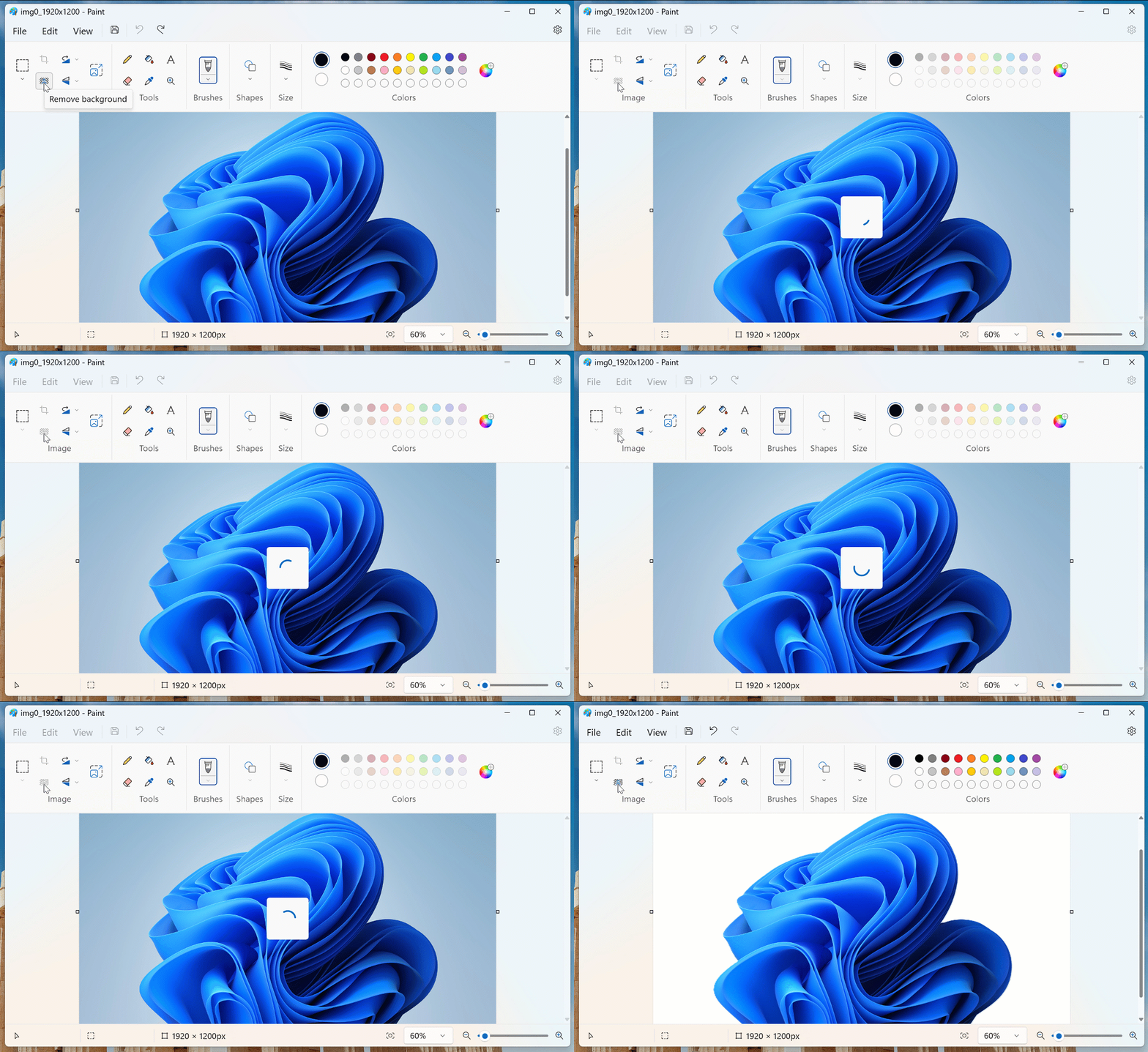
    Moreover, users aiming for precision can pair this with the rectangle select tool, specifying the area for background extraction.

    In a hands-on trial by TechUpdateDaily, the tool expertly distinguished the central image from its background, regardless of the background’s complexity or varied color shades. Although several photo-editing tools already offer this facility, Microsoft Paint’s integration provides a straightforward option for users not inclined to download specialized software.

    Interestingly, Microsoft had released an unintended Paint update earlier today. This version mistakenly displayed a confidentiality header, which has been addressed and rectified in the subsequent release.

    As per the official statement on the Paint update, “An initial release of this update (version 11.2306.28.0) mistakenly featured a confidentiality banner. The subsequent release (version 11.2306.30.0) has resolved this oversight.”

    Users should look for Paint version 11.2306.30.0 and subsequent versions to access the background removal tool. If it’s not yet visible, Microsoft urges users to await its broader release patiently.

    Found this news interesting? Follow us on Twitter  and Telegram to read more exclusive content we post.

    Post Views: 53
    Follow on Google News Follow on Flipboard
    Share. Facebook Twitter Pinterest LinkedIn Tumblr Email
    Previous ArticleWinter Dressing Tips When It’s Really Cold Out
    Next Article Massive DDoS attack on U.S. financial company thwarted by cyber firm

    Related Posts

    General News December 26, 2025

    Debian Project Launches Debian 12.1 “Bookworm” Featuring 89 Bug Remediations and 26 Security Enhancements

    December 26, 2025
    General News December 26, 2025

    Indian National Pleads Guilty to $37 Million Cryptocurrency Theft Scheme

    December 26, 2025
    General News December 26, 2025

    Kali Linux 2024.2: GNOME 46 and new security tools

    December 26, 2025
    Add A Comment
    Leave A Reply Cancel Reply

    About Us
    About Us

    We're your premier source for the latest in AI, cybersecurity, science, and technology. Dedicated to providing clear, thorough, and accurate information, our team brings you insights into the innovations that shape tomorrow. Let's navigate the future together."

    Popular Post

    Complete HTML Handwritten Notes

    NKAbuse Malware Exploits NKN Blockchain for Advanced DDoS Attacks

    Advanced Python Mastery: For the Serious Developer

    Complete C++ Handwritten Notes From Basic to Advanced

    Google Introduces New Features Empowering Users to Manage Online Information

    © 2025 Notesleu. Designed by NIM.

    Type above and press Enter to search. Press Esc to cancel.

    Ad Blocker Enabled!
    Ad Blocker Enabled!
    Our website is made possible by displaying online advertisements to our visitors. Please support us by disabling your Ad Blocker.