


University of Wisconsin-Madison’s researchers have brought to light a potential vulnerability through a Chrome extension prototype, demonstrating its ability to harvest plaintext passwords from website source codes.
Deep dive into web browser text inputs revealed a concerning gap in Chrome’s permission model, showing it goes against the best practice of adopting minimal privilege and comprehensive mediation. Even more alarmingly, popular portals like Google and Cloudflare, among many others, were found to embed passwords in plain text within their HTML source codes. This creates an avenue for Chrome extensions to easily access these passwords.
Where the Issue Lies
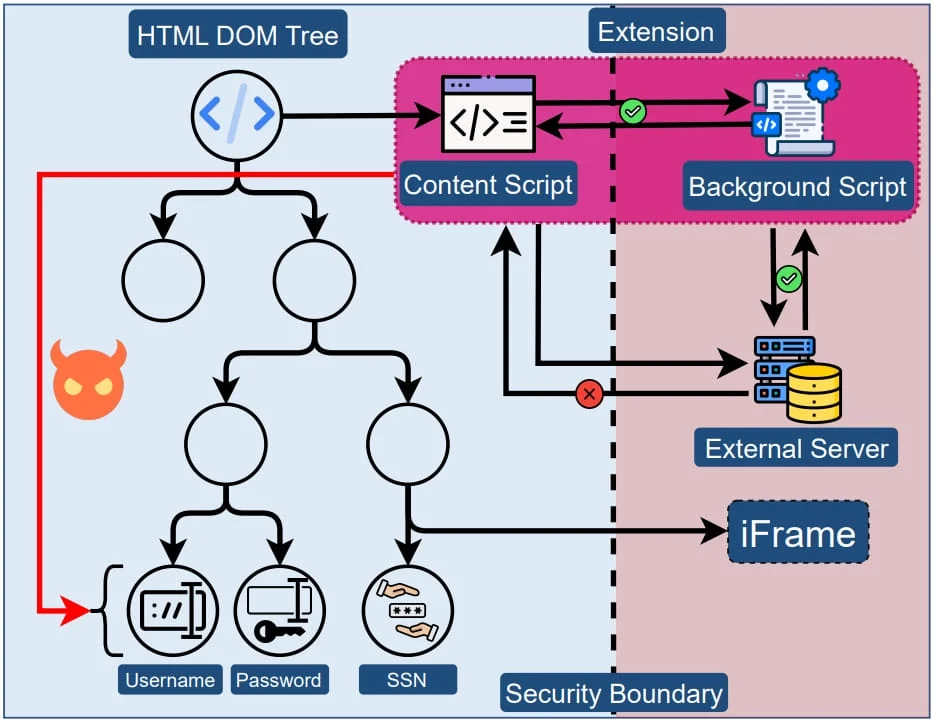
Extensions are given free rein over the website’s DOM (Document Object Model) tree when they load, providing the opportunity to access potentially confidential user input fields. Because there isn’t a security buffer between website elements and the extension, extensions can freely access any data in the source code.
Furthermore, these extensions can exploit the DOM API, enabling them to immediately extract values as users input them. This circumvents any security measures a website may have in place to obscure these inputs.
Despite the recent introduction of Google Chrome’s Manifest V3 protocol, which aims to curb API misuse and tighten extension security, there’s no concrete security boundary between extensions and web pages. Thus, the underlying issue persists.
Putting the Web Store to the Test
To examine the robustness of Google’s Web Store screening procedures, the research team built and submitted a seemingly benign Chrome extension with capabilities to execute password theft. The extension, which portrayed itself as an AI-based assistant, could:
- Record the HTML source code during a user’s login attempt.
- Exploit CSS selectors to select and retrieve user inputs.
- Swap JS-obfuscated fields with exposed password fields.
This covert approach ensured the extension met Manifest V3’s guidelines, thereby bypassing Google Chrome’s Web Store scrutiny. The research team upheld ethical considerations by avoiding actual data collection and swiftly removed the extension post-approval.
Extent of Exposure
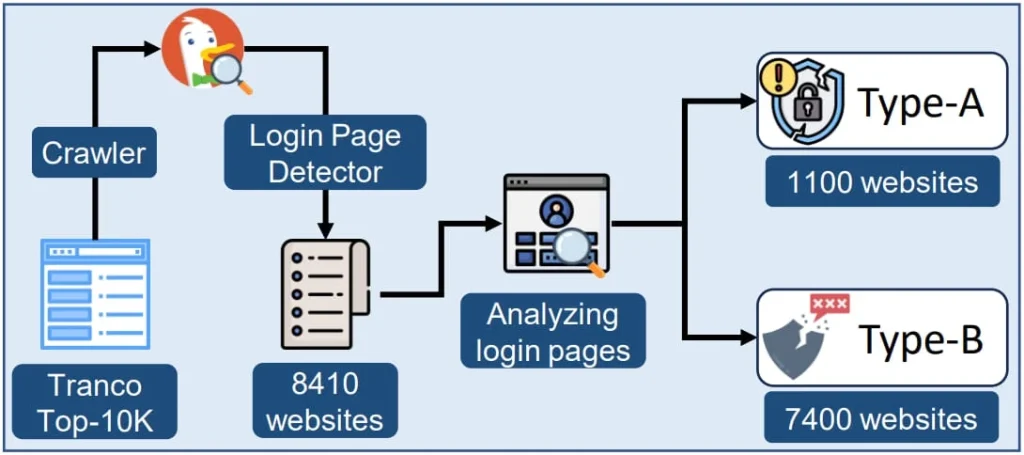
The researchers found startling numbers from the top 10,000 websites listed by Tranco, identifying around 1,100 sites that openly store passwords within the HTML DOM. An additional 7,300 were identified as susceptible to DOM API exploitation.
Their detailed study also disclosed that a staggering 12.5% of Chrome Web Store extensions (about 17,300) possess the permissions necessary to pull sensitive website information. Among these are popular extensions like ad blockers and shopping tools with millions of users.
Some high-traffic websites that showed vulnerabilities included:
- gmail.com and cloudflare.com: Displayed plaintext passwords.
- facebook.com and citibank.com: Allowed user inputs to be accessed via the DOM API.
- irs.gov, capitalone.com, and usenix.org: Showed Social Security Numbers in plaintext.
- amazon.com: Revealed credit card information in plaintext.
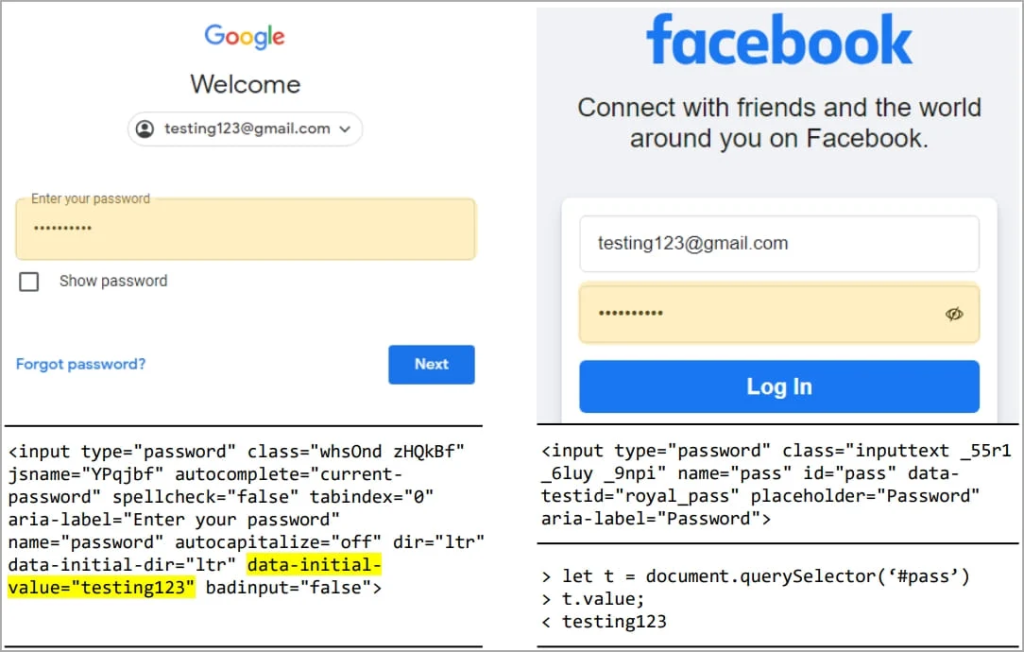
Moreover, 190 extensions, some with hundreds of thousands of users, directly engage with password fields, indicating a possible exploitation of this security loophole by some developers.
In response to these findings, Amazon emphasized their commitment to user security, urging browser and extension developers to prioritize security. Google confirmed they are investigating the findings and referred to Chrome’s Extensions Security FAQ, which currently does not treat access to password fields as a security breach, given that permissions are correctly acquired.
Found this news interesting? Follow us on Twitter and Telegram to read more exclusive content we post.